Model a Relationship
In an AtScale model, you don't model relationships directly between two datasets - you create relationships between a dataset and a logical dimension. A dimension is not considered part of a model until it has a relationship to the fact data, either directly or indirectly.
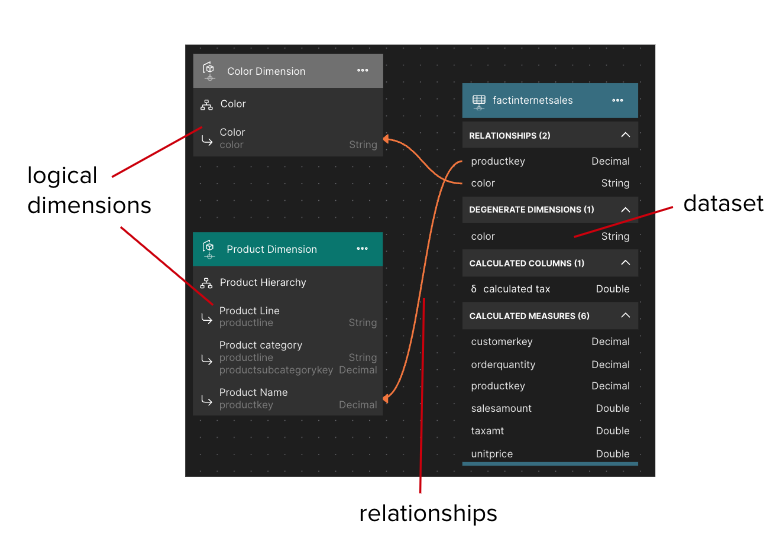
Create a relationship
To create a new relationship in your model:
-
Open your model and switch to the Canvas tab.
-
Click and drag a foreign key column from a dataset to a specific level in a dimension.
While you are selecting a level, Design Center highlights each available level on the Canvas in a specific color, indicating the join quality each would have:
- Green: The level would produce a high quality join (e.g., the datatypes of the foreign key column and the level are identical).
- Yellow: The level would produce a medium quality join (e.g., the datatypes of the foreign key column and the level are compatible, but not identical).
- Red: The level would produce a poor quality join (e.g., the datatypes of the foreign key column and the level are incompatible).
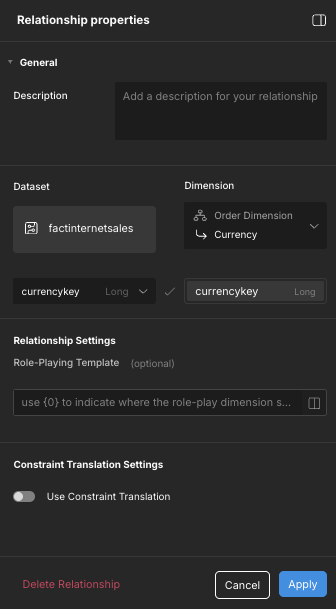
Once you select a level to join to, the Relationship properties panel opens.
-
If the level you are joining to has multiple key columns, click and drag additional dataset columns to join to them.
-
(Optional) In the Relationship properties panel, in the Description field, enter a description for the relationship.
NoteRelationship descriptions are used to provide context to other Design Center users and connected AI tools. They are added to the model's SML, but are not included in deployed models or made available to BI tools.
-
In the Dataset field, edit the selected dataset column(s) as needed.
-
In the Dimension field, edit the level you are joining to as needed.
-
(Optional) In the Role-Playing Template field, define a role-playing template for the relationship. For more information, see Role-Playing Relationships.
-
(Optional) In the Constraint Translation Settings field, enable and configure constraint translation for the relationship. For more information, see Using Constraint Translation for Fact Table Query Acceleration.
-
Click Apply.