Role-Playing Relationships
Whenever you create a relationship to a dimension, whether from a fact table to a dimension or from one dimension to another dimension, an instance of that dimension is added to the model. In some cases, the same dimension may be referenced in more than one context in the same model. A role-playing relationship is what differentiates multiple instances of the same dimension in a model.
Basics of Role-Playing
For example, suppose that you want to create a relationship between the orderdatekey and shipdatekey keys in a fact dataset and the Day level in the Date Month and Date Week hierarchies in the Date dimension. The results would look like the top four relationship lines of the model below:
Figure 1. Role-playing relationships: The Date dimension is in relationships to orderdatekey and shipdatekey in a fact dataset. The top four relationships trace to the Month and Week Hierarchies of the Date Dimension.
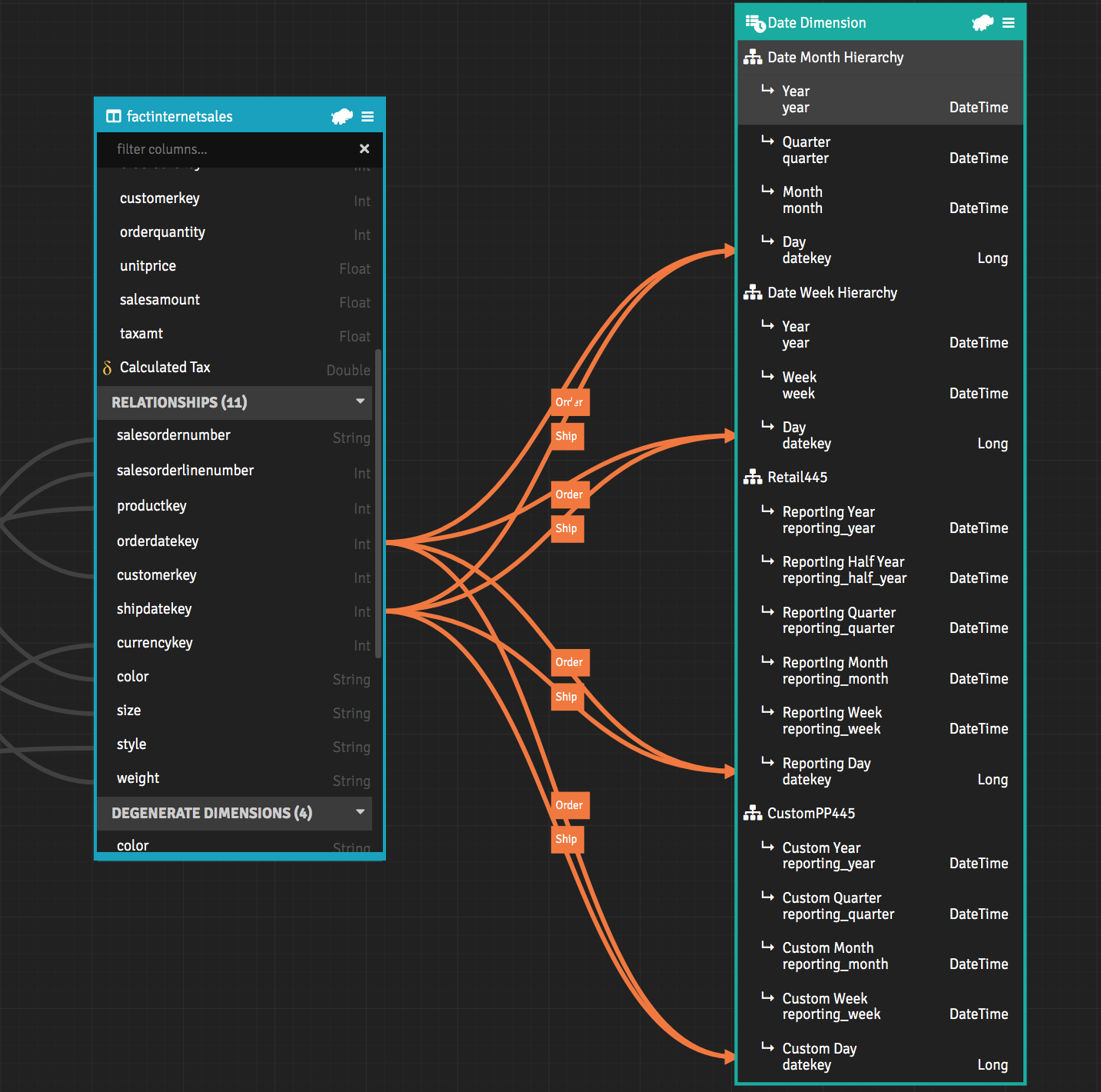
The Date dimension is in relationships with orderdatekey and shipdatekey. Each relationship is labeled with a role-playing name.
To create this relationship, you first drag orderdatekey to the Day level. The Relationship properties panel opens. In the Role-Playing Template field, you use the dimension variable {0} to insert the role-played dimension name like this: "Order {0}"
You use the dimension variable {0} to determine whether the template is a prefix, suffix, or both. For example:
- Prefix: "Order {0}"
- Suffix "{0} Order"
- Prefix and Suffix: "Order {0} Sales"
If you enter a value in the Role-Playing Template field that does not include the dimension variable {0}, AtScale assumes that the input is a prefix and appends {0} to the value when you save.
Setting a Role-playing prefix
To set a role-playing prefix:
- Drag orderdatekey to the day level of the Date Month Hierarchy within the date dimension.
- Enter "Order {0}" in the Role-Playing Template field.
- Click Apply.
The prefix "Order " is appended to every attribute of the Date dimension for queries involving order dates.
Setting a Role-Playing Suffix
To set a role-playing suffix:
- Drag shipdatekey to the day level of the Date Month Hierarchy within the date dimension.
- Enter "{0} Ship" in the Role-Playing Template field.
- Click Apply.
Though this example demonstrates the creation of role-playing relationships between a fact table and a dimension, you can also create role-playing relationships between a dimension and another dimension. To do so, open the Canvas for the dimension that the relationships will be created from. Add the second dimension from the Workspace panel, then create the role-playing relationships as described in the example above.
Setting a Role-Playing Prefix and Suffix
To add a suffix and prefix to your role-playing relationship:
- Drag orderdatekey to the day level of the Retail hierarchy within the date dimension.
- Enter "Order {0} Finance" in the Role-Playing Template field.
- Click Apply.
Recursion
Role-playing becomes recursive when you create role-playing relationships between a fact table and a dimension, and between that dimension and another dimension.
For a simple example, suppose that you have a fact table and two dimensions.
- Fact table:
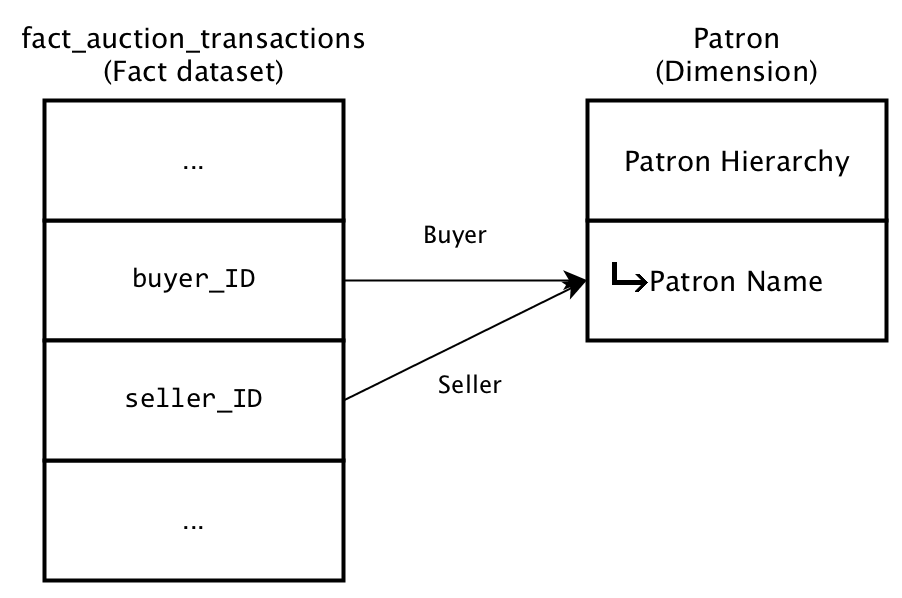
fact_auction_transactions. Among other fields, each transaction recorded contains keys for buyers and for sellers. - Dimension:
Patron. Among other attributes, each patron has a name, a key for a billing zipcode, and a key for a shipping zip code. - Dimension:
Geography. Among other attributes, this hierarchy includes zip codes.
On the model Canvas, you create two role-playing relationships from the buyer_ID and seller_ID keys to the Patron Name level of the Patron hierarchy.
You open the Canvas for the Patron dimension and add the Geography hierarchy. Then, you create two role-playing relationships from the billing_zip_ID and shipping_zip_ID keys to the Zip Code level of the Geography hierarchy in the Geography dimension.
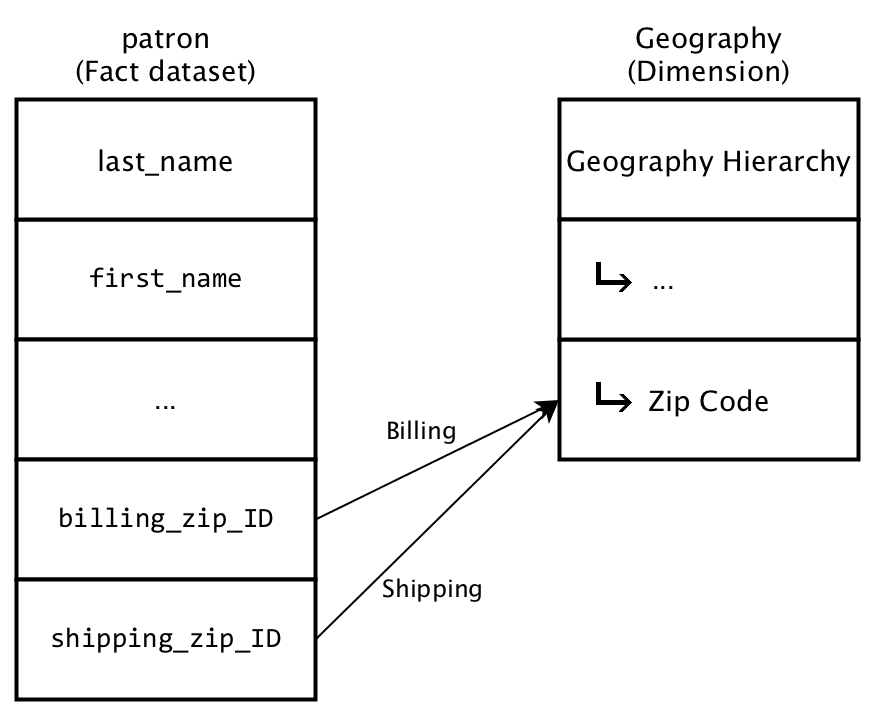
You then have four copies of the Zip Code attribute:
- Buyer Billing Zip Code
- Buyer Shipping Zip Code
- Seller Billing Zip Code
- Seller Shipping Zip Code