Manage Licenses
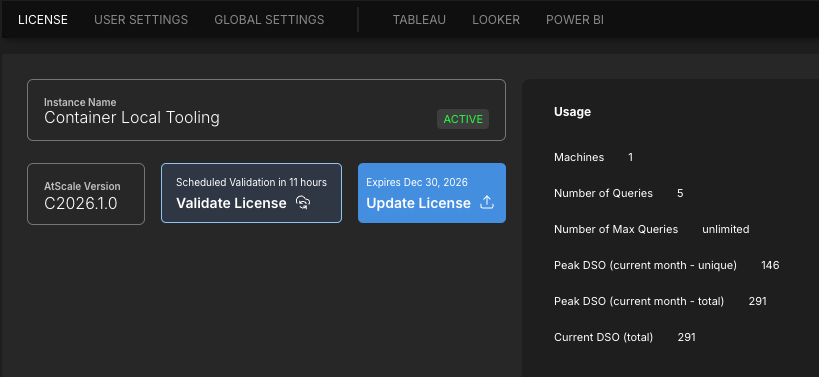
On the License tab of the Settings page, you can view information about your AtScale instance and license, including your license expiration date, details about your usage of the platform, and the specific features included in your license. You can also validate and update your license, as needed.
The License tab is only accessible by users with certain roles. For more information, see Identity Broker Default Roles.
About the License tab
On the License tab, you can view information about your AtScale instance and license, including:
-
General information about your license and instance, such as the version of AtScale you are on and your license's expiration date.
-
Information about your usage of the platform:
- Machines: The number of machines/servers AtScale is installed on.
- Number of Queries: The number of queries run this month.
- Number of Max Queries: The number of queries your license permits per month.
- Peak DSO (current month - unique): The number of unique deployed semantic objects (DSOs) for this month.
- Peak DSO (current month - total): The total number of DSOs for the month.
- Current DSO (total): The number of DSOs for the day.
-
The data warehouse platforms your license permits.
-
Additional features that your license includes.
Validate your license
AtScale automatically validates your license once a day. However, you may need to manually validate it if you know it will expire before the next check. Otherwise, you may experience a temporary loss of service.
To validate your AtScale license:
- Log in to AtScale as an admin user.
- In the sidebar, click Settings. The Settings page opens.
- On the License tab, click Validate License.
AtScale validates your license and displays a notification indicating its current status.
Update your license
To update your AtScale license:
- Log in to AtScale as an admin user.
- In the sidebar, click Settings. The Settings page opens.
- On the License tab, click Update License. The Update License panel opens.
- Enter your new license key and click Submit.